Context란?
Context는 스프링의 컨테이너를 구체화한 객체이다.
컨테이너는 조립되기 위해 생성된 Bean(객체)가 담겨져 있는 공간이며,
Context 역시 조립되기 위해 생성된 Bean(객체)가 담겨져 있는 컨테이너 객체를 의미한다.
DispatcherServlet이란?
먼저, Servlet은 자바 웹 개발에 있어서 통신의 인터페이스 역할을 하는 기술을 의미한다.
즉, 클라이언트 요청을 받고, 결과를 전달해주는 역할이다.
(웹 서버 통신에서 요청이 들어오고, 결과가 나가는 첫 번째 문이랄까..)
스프링은 front controller pattern이라고 해서 중심 Servlet이 모든 요청을 같은 알고리즘으로 처리하는데,
이 때 이 중심 Servlet이 DispatcherServlet이다.
(실제 동작은 컨트롤러 등과 같은 여러 컴포넌트가 실행한다. - DispaterServlet은 여기로 넘겨주는 역할!)
(여러 개일 수도 있지만 하나만 쓰는 걸 권장하는 듯!)
생성 방법 : web.xml에서 태그를 이용한다.
DispatcherServlet와 Context
DispatcherServlet은 필요한 Bean(객체)를 생성하고 조립하는 등의 설정이 필요하고, 이것이 Context를 통해 이루어진다.
이 때, 필요한 객체는 ViewResolver, HandlerMapping 등 내부 Bean과 개발자가 직접 만드는 Controller, Service, Dao 등이 있다.
DispatcherServlet과 설정을 위한 Context xml파일을 연결시키는 것 역시 web.xml에서 진행된다.
root-context와 servlet-context
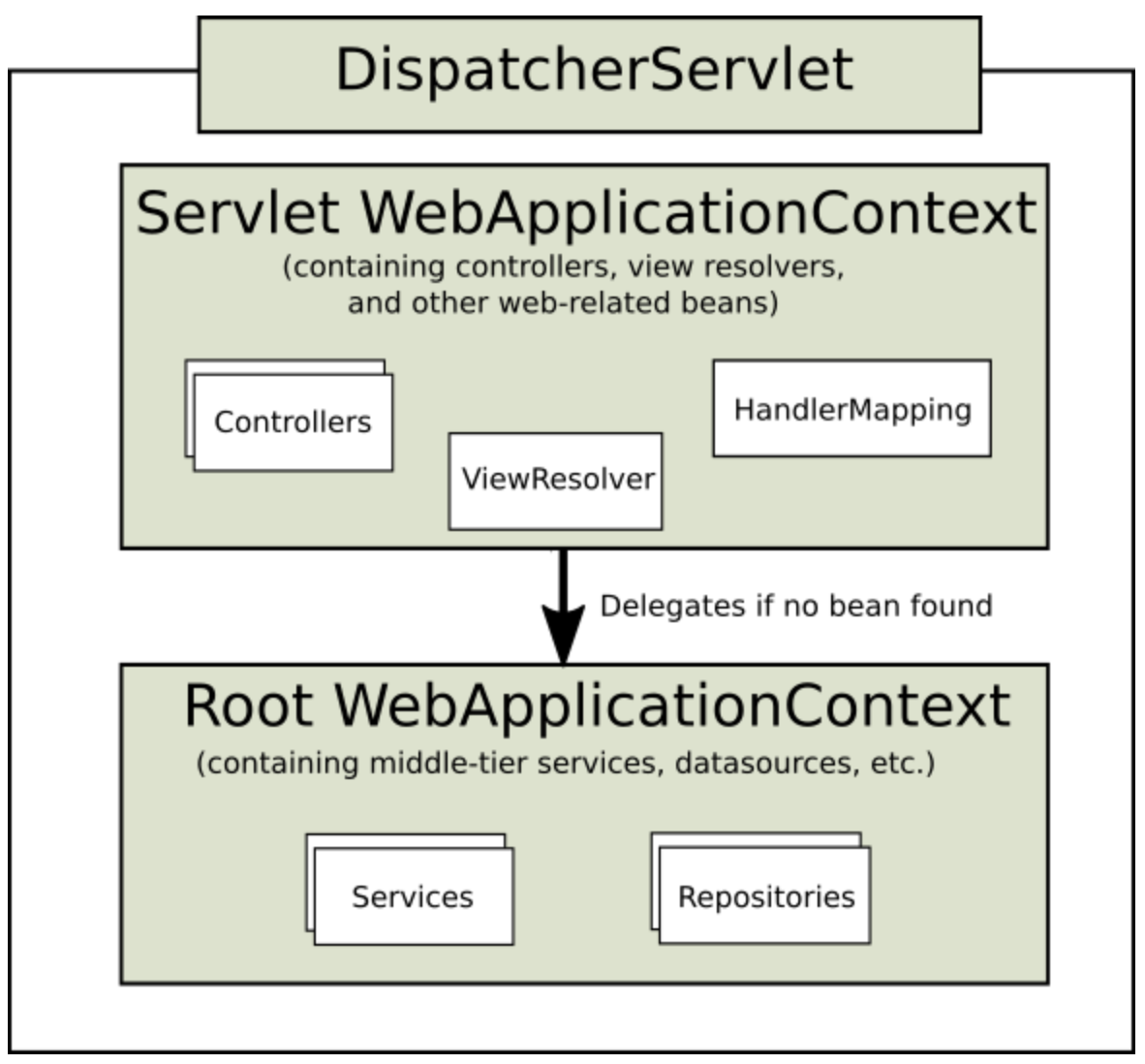
보통 우리가 스프링 프로젝트를 만들면 root-context와 servlet-context를 볼 수 있다.
두 Context 모두 DispatcherServlet을 설정하기 위해 필요하다.
다만, 차이는 servlet-context는 각 DispatcherServlet마다 가지고 있는 것이고,
root-servlet은 모든 DispatcherServlet이 공유하는 것이다.
이 때문에, servlet-context는 Controller와 ViewResolver, HandlerMapping 등과 같이 각DispatcherServlet마다 다르게 필요한 Bean(객체)정보를 가지고 있고,
root-context에는 모든 DispatcherServlet에 필요한 Bean(객체)정보를 가지고 있어, Service, Dao 뿐만 아니라 모든 곳에서 공통으로 쓰일 법한 DB관련 객체 등이 포함되어야한다.
그림은 DispatcherServlet은 필요한 Bean(객체)를 먼저 servlet-context라는 컨테이너에서 찾고, 없으면 root-context에서 찾는 걸 보여준다.
root-context와 servlet-context의 이러한 차이를 알면, 어떤 Bean을 어디에 생성해야할지 생각할 수 있다.
web.xml에서의 설정
1 2 3 4 5 6 7 8 9 10 11 12 13 14 15 16 17 18 19 20 21 22 23 24 25 26 27 28 29 30 31 32 33 34 35 36 37 38 39 40 41 42 | <?xml version="1.0" encoding="UTF-8"?> <web-app xmlns:xsi="http://www.w3.org/2001/XMLSchema-instance" xmlns="http://xmlns.jcp.org/xml/ns/javaee" xsi:schemaLocation="http://xmlns.jcp.org/xml/ns/javaee http://xmlns.jcp.org/xml/ns/javaee/web-app_3_1.xsd" id="WebApp_ID" version="3.1"> <!-- 1. root-context를 설정한다. --> <context-param> <param-name>contextConfigLocation</param-name> <param-value>/WEB-INF/spring/root-context.xml</param-value> </context-param> <!-- 2. 모든 서블릿에 의해 공유되는 스프링 Container생성 --> <listener> <listener-class>org.springframework.web.context.ContextLoaderListener</listener-class> </listener> <!-- 3. DispatcherServlet 생성 및 설정 --> <servlet> <servlet-name>appServlet</servlet-name> <servlet-class>org.springframework.web.servlet.DispatcherServlet</servlet-class> <init-param> <param-name>contextConfigLocation</param-name> <param-value>/WEB-INF/spring/appServlet/servlet-context.xml</param-value> </init-param> <load-on-startup>1</load-on-startup> <!-- multipart설정 --> <multipart-config> <location>/Users/songtaeheon/Documents/2020-1/SpringFramework/upload/temp</location> <max-file-size>20971520</max-file-size> <!-- 20MB --> <max-request-size>41943040</max-request-size> <!-- 40MB --> <file-size-threshold>20971520</file-size-threshold> <!-- 20MB --> </multipart-config> </servlet> <servlet-mapping> <servlet-name>appServlet</servlet-name> <url-pattern>/</url-pattern> </servlet-mapping> </web-app> | cs |
- root-context를 설정한다.
- 모든 서블릿에 의해 공유되는 스프링 Container생성
- DispatcherServlet 생성 및 설정
'Spring' 카테고리의 다른 글
| Spring - 의존성주입 방법의 비교(생성자 주입, Setter주입, field주입) (0) | 2020.06.11 |
|---|---|
| SpringSecurity - jdbc를 이용한 인증/권한 처리 (0) | 2020.05.12 |
| SpringSecurity - 서블릿 기반 구조 (0) | 2020.05.12 |
| Spring - 관점 지향 프로그래밍(AOP) (0) | 2020.05.05 |
| Spring - 의존성 주입(DI)/IoC컨테이너/ApplicationContext (0) | 2020.05.05 |
